Problem Returning to Form After Adding Record

My StudyGroups form has a page for Members in the group, powered by a DataView. I can click the AddMember action button to add a new member to the list of members in the group. This runs the AddGroupMember function:

function AddGroupMember(five, context, result)  {
        
        const parentForm = five.variable.MyForm; 
        const parentKey = five.variable.MyKey;
        
        let vars = {
            ParentTable: null,
            MemberKey: null,
            StudyGroupKey: null,
            IsLeader: false,
            IsCoordinator: false,
            IsCoLeader: false,
            IsAssistant: false,
            IsSunshine: false,
            GroupPaidDate: null,
            CheckNumber: null
        };

        if (parentForm === "Members") {
            vars.ParentTable = 'Members';
            vars.MemberKey = parentKey;
        } else if (parentForm === "StudyGroups") {
            vars.ParentTable = 'StudyGroups';
            vars.StudyGroupKey = parentKey;
        }
        five.setVariable("Vars", vars);
        // five.showMessage(JSON.stringify(five.variable.Vars));
        try {
            five.selectAction("AddGroupMemberProcess");
            return five.success(result);
        }
        catch (e) {
            five.showMessage("Error: " + e.message);
            return five.failure(result);
        }
    }

The AddGroupMemberProcess has screen fields for all of the fields in the GroupMembers table. It also has an action button to return directly back to the calling form, like a “cancel” button. This code is run:

function ReturnFromInputForm(five, context, result)  {
    five.showMessage('MyForm: ' + five.variable.MyForm + '\nMyKey: ' + five.variable.MyKey);
    
    five.selectAction(five.variable.MyForm, five.variable.MyKey);
    // return five.success(result);
}

This code seems to run just fine, and return me to the StudyGroups form properly.

However, when I actually choose the field values in the process’ screen fields, then click the run checkmark, these functions are run:

function InsertGroupMember(five, context, result)  {
    
    // make sure we selected member or group
    if (five.field.ParentTable === 'StudyGroups' && !five.field.MemberKey) {
        return five.createError("You must select a member before running this process.");
    }
    if (five.field.ParentTable === 'Members' && !five.field.StudyGroupKey) {
        return five.createError("You must select a study group before running this process.");
    }    
    
    let parms = {
            ParentTable: 'StudyGroupMembers',
            StudyGroupKey: five.field.StudyGroupKey ? `'${five.field.StudyGroupKey}'` : 'NULL',
            MemberKey: five.field.MemberKey ? `'${five.field.MemberKey}'` : 'NULL',
            IsLeader: five.field.isLeader ? 1 : 0,
            IsCoordinator: five.field.isCoordinator ? 1 : 0,
            IsCoLeader: five.field.isCoLeader ? 1 : 0,
            IsAssistant: five.field.isAssistant ? 1 : 0,
            IsSunshine: five.field.isSunshine ? 1 : 0,
            PaidDate: five.field.GroupPaidDate ? `'${five.field.GroupPaidDate}'` : 'NULL',
            CheckNumber: five.field.CheckNumber ? `'${five.field.CheckNumber}'` : 'NULL'
    }
    // five.log('Calling server function');
    five.executeFunction('InsertGroupMemberServer', parms, null, '', '', function (serverResult) {

        if (typeof serverResult.isOk === 'function' && serverResult.isOk()) {
            five.selectAction(five.variable.MyForm, five.variable.MyKey);
        } else {
            const rows = checkResult.rows; // rows is an array
            if (rows && rows.length > 0 && rows[0].ExistingCount > 0) {
                return five.createError("This member is already assigned to this study group.");
        }
        five.showMessage("Insert failed: " + errorMessage);
        }

    });
    // return five.success(result);
}
function InsertGroupMemberServer(five, context, result) {
    
    const newKey = five.uuid();
    const table = context.ParentTable;
    const groupKey = context.StudyGroupKey;
    const memberKey = context.MemberKey;
    const isLeader = context.IsLeader;
    const isCoordinator = context.IsCoordinator;
    const isCoLeader = context.IsCoLeader;
    const isAssistant = context.IsAssistant;
    const isSunshine = context.IsSunshine;
    const paidDate = context.PaidDate;
    const checkNumber = context.CheckNumber;
    
    // if member is already in group, warn and exit
    const checkSQL = `SELECT COUNT(*) AS ExistingCount FROM ${table} WHERE StudyGroupKey = ${groupKey} AND MemberKey = ${memberKey}`;
    const checkResult = five.executeQuery(checkSQL, 0);
    five.log(checkSQL);

    // If the query failed
    if (!checkResult.isOk || !checkResult.isOk()) {
        return five.createError("Could not check for existing member assignment.");
    }

    // If the record already exists
    const rows = checkResult.rows;
    if (rows && rows.length > 0 && rows[0].ExistingCount > 0) {
        return five.createError("This member is already assigned to this study group.");
    }
    const sql1 = `INSERT INTO ${table} ( StudyGroupMembersKey, StudyGroupKey, MemberKey, IsLeader, IsCoordinator, IsCoLeader, 
                    IsAssistant, IsSunshine, GroupPaidDate, CheckNumber ) `;
    const sql2 = `VALUES ( '${newKey}', ${groupKey}, ${memberKey}, ${isLeader}, ${isCoordinator}, ${isCoLeader}, ${isAssistant}, 
                    ${isSunshine}, ${paidDate}, ${checkNumber})`;
    let sql = sql1 + sql2;

    five.log(sql1);
    five.log(sql2);

    const queryResult = five.executeQuery(sql, 0);
    if (queryResult.isOk && queryResult.isOk()) {
        return five.success({ StudyGroupMembersKey: newKey });
    } else {
        let err = "Insert failed.";
        if (queryResult.errorMessage) {
            err = queryResult.errorMessage();
        } else if (queryResult.error) {
            err = queryResult.error;
        } else {
            err = JSON.stringify(queryResult); // fallback for inspection
        }
        five.log("Insert Error: " + err);
        return five.createError("Insert failed: " + err);
    }
}

Notice the code in the InsertGroupMember function that should return me to the original calling form if the insert went ok. This is basically the same code that gets executed when cancelling the process, but it does not return me to the calling form.

Can you please advise why this isn’t working as expected?

UPDATE:
Since nothing visual happens on the process screen when clicking the checkmark, it looks like the new record has not been saved. So the user is tempted to click the checkmark again. This results in multiple member records being added to the study group. Similar to the issue happening when I edit a member in the group, I can click the Return button to go back to the calling form, but this shouldn’t need to be done. There must be a way to immediately get the process to complete and then execute code to return to the calling form. Again, we could really use an After Complete event.
It’s been almost 3 weeks since I asked this question. I get that you folks are very busy, but the forum can’t help me if you don’t answer my questions. I’m stuck on this project without knowing these answers.

Anything? Now it’s been 5 weeks.

Hi Ron,

The issues look like they are in your InsertGroupMember function.

Main issue

1.1 - The property serverResult.isOk, does not exist. Therefore, the selectAction functionality will never work.

This happened because the InsertGroupMemberServer function does not return the property isOk for the callback.

1.2 - The variable errorMessage and the property checkResult do not exist. Therefore, any validation of them would cause an error.

These issues can be found using the console in the browser.

Kind regards,

Jo

Any progress in adding an AfterComplete event? As I mentioned, I can remove the function from the OnComplete event, and simply have users click the Return action button, but there should be a way to do this programatically without having to click that extra button. Thanks…

Again, almost 2 months with no answer. This topic is directly related to the other topic, Delete and Edit Not working Properly. Have you made any progress on an AfterUpdate event? thanks…

Hi Ron,

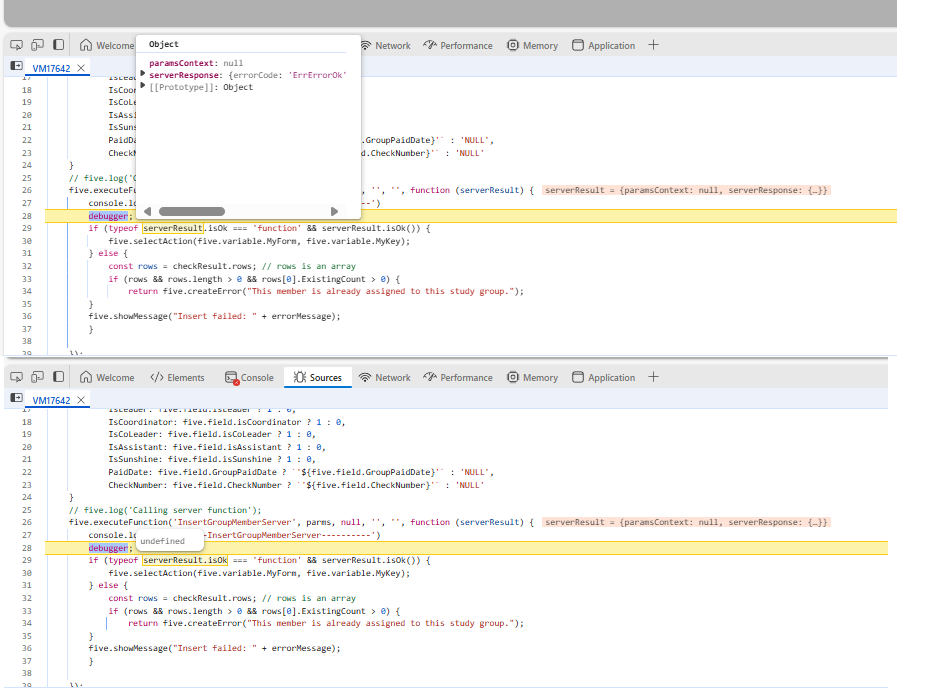
As mentioned previously by Jo, the property ‘isOk’ does not exist, as you can see on the image attached while debugging this function. Therefore, the selectAction will never be called (the menu won’t change).

Solution based on the current code: I believe you want to check for the property ’errorCode’ and compare it with the code ‘ErrErrorOk’ to indicate the process is OK.
Comment the line:
if (typeof serverResult.isOk === ‘function’ && serverResult.isOk()) {
Replace with the line:
if (serverResult.serverResponse.errorCode == ‘ErrErrorOk’) {

Observation: the function InsertGroupMemberServer is responsible for formatting the return for the callback. If you want to format a specific code or property, such as ‘isOk’, it needs to be changed there.

Please let me know if you have any questions about my explanation.

Regards,
Elton S

Thanks Elton, that worked perfectly. I just changed the IF condition as you specified. I have no need to customize a specific response at this time.

Now that focus is returned to the calling form, is it possible to return to the specific page I was on? I can save the page name in a variable but how do I navigate to that page? Thanks…

Hi Ron,

At this stage, we cannot return to a specific form page by using the selectAction function.

I will bring this feature request to our product review, and I will keep you updated about any outcome.

regards,
Elton Santos

Thanks Elton. That would be a nice feature to have, so when I return from adding/editing/deleting a detail record, it would go right back to the detail page I just came from. Please let me know if you folks do decide to do this.

Now that I’m on version 3, I should be able to return to a prior form page according to the release notes and new documentation.

If I am in my Members form and click the Groups tab to go to that page, it runs my SetSubformNameGroups function. Since there is no way to know what the active page is on a given form, I needed to add a function for each page and each form.

function SetSubformNameGroups(five, context, result)  {
    five.setVariable('SubformName', 'Groups');
    return five.success(result);
}

When I leave the page it runs this:

function SetSubformNameNone(five, context, result)  {
    five.clearVariable('SubformName');
    return five.success(result);
}

When I go to another form, say to add a new group to a member, and click the Cancel or Return button, it runs this:

function ReturnToPriorForm(five, context, result)  {
    
    const returnForm = five.getVariable('ReturnToForm') || five.getVariable('MyForm');
    const returnKey = five.getVariable('ReturnToKey') || five.getVariable('MyKey');
    const returnPage = five.getVariable('SubformName') || '';
    five.log(`returnForm=${returnForm}, returnKey=${returnKey}, returnPage=${returnPage}`);
    
    five.clearVariable('ReturnToForm');
    five.clearVariable('ReturnToKey');

    if (returnForm) {
        if (returnKey) {
            if (returnPage) {
                five.selectAction(returnForm, returnKey, returnPage);
            } else {
                five.selectAction(returnForm, returnKey);
            }
            
        } else {
            five.selectAction(returnForm);
        }  
    }

}

I just added the returnPage variable and extra if condition.

I expect it to return control to the Members form and also select the Groups page, but it doesn’t. It does properly go back to the form and selects the proper record, but doesn’t select the Groups page.

When I use the inspector, the SubformName variable is initially missing, then when I click to activate the Groups page, I see the variable there, but when I click back to the General page, the variable is still there, even though it should be removed.

Sometimes the inspector variables don’t refresh right away. For example, when I navigate to the Groups page, that variable doesn’t show up in the inspector. but if I switch to another inspector tab then back to Variables, it soes show. But moving back to the General page, the variable is still there in the inspector and the value is still “Groups”. So not only is the variable still there, when it is supposed to be there, the selectAction command is not taking me back to that page.

To further complicate matters, sometimes the inspector log is totally blank, even though i’ve told it to log things.

Hi Ron,

I am unfamiliar with your application, could you please put together a small sample application of what is happening.

Our inspector is currently going through some testing, there will be improvements to it soon.

Kind regards,

Jo

It would be difficult to put this in a new application. So please look at my application, which I’ve copied to the FDFs folder on OneDrive. Elton has the shortcut and knows the IDs and passwords.

First:
Does Five now have a way to easily identify the active page on a form? It never did before, so in the Members form, when I activate the Groups page, it runs a function called SetsubformNameGroups, which sets the variable MyPage to the ID of the page (it also sets SubformName, but that is being phased out).
Can you verify if there is a way to know the ID of the page without setting a variable?

Second:
If I open the Members form under Setup > Members and Groups and select any member, then click the Groups page, that MyPage variable is now set to “Groups”.
If I click the Add Interest Group button, it runs the AddGroupMember function. This function sets a context variable, then runs a process:

    five.setVariable('ReturnToForm', five.variable.MyForm);
    five.setVariable('ReturnToPage', five.variable.MyPage);
    
    try {
        five.selectAction("AddEditGroupMemberProcess");
        return five.success(result);
    }
    catch (e) {
        five.showMessage("Error: " + e.message);
        return five.failure(result);
    }

Note it sets ReturnToForm and ReturnToPage variables first.

If I get to that process, then click the cancel button, it runs this function:

function ReturnToPriorForm(five, context, result)  {
    
    const returnForm = five.getVariable('ReturnToForm') || five.getVariable('MyForm');
    const returnKey = five.getVariable('ReturnToKey') || five.getVariable('MyKey');
    const returnPage = five.getVariable('ReturnToPage') || '';
    five.clearVariable('ReturnToForm');
    five.clearVariable('ReturnToKey');
    five.clearVariable('ReturnToPage');

    if (returnForm) {
        five.log(`ReturnToPriorForm: returnForm=${returnForm}, returnKey=${returnKey}, returnPage=${returnPage}`);
        if (returnKey) {
            five.selectAction(returnForm, returnKey, returnPage);
        } else {
            five.selectAction(returnForm);
        }  
    }

}

Note it sets local variables from known variables then uses them to return to the prior form and page. Note the log entry showing the proper values:

"ReturnToPriorForm: returnForm=Members, returnKey=728aad7f-bb02-4d51-922b-bf7be5a5b973, returnPage=Groups"

So the selectAction, given the proper arguments, should go to the Groups page according to your release notes. But instead, it goes to the proper form, selects the proper record, but stays on the General page.

Sorry to be so verbose, but I wanted to give you enough to see that it isn’t working for me.

I hope you can understand my explanation and advise why it’s not activating the Groups page.

Thanks…

Hi Ron,

This has been corrected; I will organize an upgrade for you soon once everything is ready.

Kind regards,

Jo

Thanks so much Jo. Please let me know when it is ready.

Hi Ron,

Your account has been updated, and this should work correctly for you now.

Kind regards,

Jo