Delete and Edit not Working Properly

I’m having problem when trying to delete or edit a record. My StudyGroups form has a general page and a Members page, showing which members are in the group. This is achieved by using a data view which displays the GroupMembers table records for that study group. When I click the name of a member in the DataView, it causes the EditMemberGroup function to run, which opens the GroupMembers form, and navigates directly to the record just selected:

    five.selectAction('GroupMembers',five.field.StudyGroupMembersKey)

The problem is that when the GroupMembers form opens, if I edit any of the fields and save the record, or if I even try to delete the record, it doesn’t work. Nothing happens. When I navigate back to the original form and DataView, the member is still there with the old values.

I hope you can help me with this.
Thanks…

Update:
I just realized that the On Complete event, which calls the ReturnFromImputForm function, is being executed before the data is being updated on the server, which seems to prevent that from happening.

I removed the function from On Complete, and the record gets saved or deleted properly.

So is there a way to return to the calling form AFTER the record gets saved or deleted? I don’t see an After Complete event.

In the case of editing a record, the record gets saved, then I can click the Return button to go back to the calling form. This shouldn’t have to be done, there should be a way to return to the calling form after the record has been saved.

In the case of deleting the record, when I click Yes to the delete confirmation, the record gets deleted, but the GroupMembers form simply disappears from the right side of the screen. The list on the left, now empty, has columns that refer to the GroupMembers form rather than the StudyGroups form that called it. I now need to navigate back to the StudyGroups form using the menu. This is totally unworkable.
Is there any way you could look at this issue and give me an answer? How can I run code called by On Complete if it prevents the changes from being saved? Isn’t there any way to run code AFTER the data has been saved?

Hi Ron,

Have you tried your data view in live mode? For your data source (query) turn the Live switch on and this will make the results live without refreshing, it may help.

Kind regards,
Jo

Hi Jo,

I’m thinking my explanation of the problem was inadequate. I am not so much having a refresh issue (which a live query would indeed fix). I am pretty sure it’s already a live query. The issue is that the record I’m trying to edit or delete is never actually updated to / deleted from the database if I use an On Complete function. Even if I exit and return to the form, the changes are not there.

If I remove the On Complete function, the record does get modified or deleted properly, but then the UI never returns to the original form. The function is supposed to return to the calling form, but that seems to stop the server-side function from completing its job.

That is why I asked about executing a function AFTER completing the edit. It seems like either adding an After Complete event OR figure a way to do this async by using Await would work, but I don’t know Five enough to state that.

Can you help with the issue after this clarification?

GroupMembers-20250729-234514814335.fdf (3.4 MB)

Hi Ron,

Attached is a sample that works in how you are explaining, in the case of something I am missing, please update this example to demonstrate the issue so I can understand your problem.

Kind regards.

Jo

Hi Jo,

Thanks for taking the time to create this example. Unfortunately, it does not do what I am trying to do, so I can’t recreate the error situation. In my application, I put in a function ReturnFromInputForm, which uses variables defined when I was on the StudyGroups form to go back to that form and select the record (study group) that I was working on. When I call that function in the OnComplete event of the GroupMembers form. If I call that function when saving the changes to the GroupMembers form, the record does not actually get saved. Don’t know why. But if I do NOT call that function in GroupMembers OnComplete event, the record DOES get saved and remains on the GroupMembers form. It seems that calling that function in OnComplete prevents the save from actually happening. This is why I inquired about an AfterComplete event, which would solve the issue..

I tried to duplicate this logic in your sample by adding the return function, but when running, it just causes an error message.

I put this code in the OpenPeopleForm function:

five.setVariable('MyForm', five.actionID);    
five.setVariable('MyKey', five.field.StudyGroupsKey)
five.selectRecord('Peoples', five.field.PeopleKey);

then I put this code in the ReturnToGroups function:

    five.showMessage('MyForm: ' + five.variable.MyForm + '\nMyKey: ' + five.variable.MyKey);
    
    five.selectRecord(five.variable.MyForm, five.variable.MyKey);
    return five.success(result);

I get this message:

MyForm: function(){return this.internal.actionID}
MyKey: undefined

I expected it to say the form name and the key value in the message.

So how do I run code to return to the calling form?

Hi Ron,

Try the following:

Create a function : SetCurrentStudyGroupKey

function SetCurrentStudyGroupKey(five, context, result) {

five.setVariable('MyKey', five.field.StudyGroupsKey);

return five.success(result);

}

Attach it to the StudyGroups On Show event, this will update your MyKey to the current study group the user has selected.

Then change the following line :

five.setVariable(‘MyForm’, five.actionID);

To

five.setVariable(‘MyForm’, five.actionID**()**);

actionID is a function, this is the reason for the weird output you are getting ( MyForm: function(){return this.internal.actionID} ) which is basically telling you that the value is a function, so you need to call it to get the actual value.

Cheers,

Jo

Thanks for the reply Jo.

The edit and delete now work, but the problem occurs after the changed record is saved or the record is deleted.

Saving GroupMembers after edit:
When I finish the changes I want made to the GroupMembers record, I can click the save checkmark, and the changes do indeed get saved. But the GroupMembers form stays active (perhaps as expected). If I click the “Return” action button, its OnComplete event calls the ReturnFromInputForm function which, using the previously setup variables, takes me back to the StudyGroups form and selects the record I had been viewing. The Return button is intended more like a “Cancel” button to go back if I didn’t want to make changes after all. But it also works if I save my changes then click it. But the intent is to go back to the prior form after saving the changes without having to click another button. I tried adding a call to ReturnFromInputForm in the OnComplete event. But this causes the save to NOT happen, because OnComplete seems to fire before the record is saved, not after. We really need an AfterComplete event to call the ReturnFromInputForm function.

Deleting group members:
This should work similarly to saving after an edit. When I show a GroupMembers record, click edit then click delete, the record is indeed deleted. But this leaves me with a blank screen on the right, and a list of GroupMembers records on the left. I don’t even see the Return button anymore, unless I select a different GroupMembers record from the list. Like saving after edit, if I put a call to ReturnFromInputForm function in the OnComplete event, the record never gets deleted. We really need an AfterComplete event.

Can you help with this issue?

Hi Ron,

Currently we do not have an After Complete event, I will note this down for us to discuss in our next product review. What is in your On Complete function?

Kind regards,

Jo

Right now, nothing is in the OnComplete function of the GroupMembers form. What SHOULD be there is this function:

function ReturnFromInputForm(five, context, result)  {
    five.showMessage('MyForm: ' + five.variable.MyForm + '\nMyKey: ' + five.variable.MyKey);
    five.selectAction(five.variable.MyForm, five.variable.MyKey);// return five.success(result);
}

But as I’ve mentioned, calling this function from OnComplete will cause the calling form to be reloaded, but then the save action from the GroupMembers form will not actually complete.

What I really need is a way to let the record save or delete complete, then have focus returned to the original calling form. I suppose I need another event called AfterDelete so if a record is deleted, the focus can also return to the calling form.

I last posted to this topic a month and a half ago, and no further answers.

PLEASE can you answer this, and advise if the newest version of Five handles this any better? It would be so much better if I can return to the calling form after my update has posted to the database. How can this be done? Thanks…

Hi Ron,

I read all the details, and I still have some doubts about which functionality I should check.

Could you please provide the steps for this scenario and the result you are expecting?

Regards,
Elton S

This is frustrating. I don’t blame you folks, maybe I’m just having troubles stating my case.

If I edit a group member by clicking their name in the Members page of the StudyGroups form, this opens up the GroupMembers form (via the EditMemberGroup function). I make my change and save the record. Then I must click the Return action button to go back to the calling form. While this works fine, it is an extra step that the user must be trained for. I’m looking for somewhere that I can code to return to the calling form via the ReturnFromInputForm function. But where can I call that function from after saving the GroupMembers form? as mentioned several times, calling that function from OnUpdate event prevents the update from even happening. This is why I keep mentioning an AfterUpdate event. that is just my take. You folks may have a better idea. Even though I can click the Return button after the record is saved, this is not foolproof. Why? Because if I delete the GroupMember record instead of editing it, the entire form goes away, including the Return action button. All I’m left with is a blank screen with a list on the left pane. this list is still from the GroupMembers table, so it shows groups and members (of course). I would have to click one of the list items to bring up a record from the GroupMembers table just so we can see the form and the Return button.

So again, I’m looking for a way to run code that brings me back to the calling form after successfully saving or deleting a group member on the GroupMembers form, but can’t use the OnComplete method. Thanks…

Since I was able to get my AddGroupMember working by running a process after building a context object, why can’t I do that for editing and deleting a group member? If so, I can perhaps control what functions get run. I would need to add more action buttons to the existing “add” process, making it an “add/edit” process. there would be a save button, a delete button and a cancel button. the save button would be used instead of the default checkmark run button. If I wrote functions to add the record or edit the record or delete the record, those functions could call server-side functions to do the work, then rely on the return codes to return to the calling form.

Is it possible to disable the standard checkmark button on a process? I wouldn’t need that if I have custom action buttons, right? Thanks…

Hi Ron,

At this stage, we don’t have an event to be triggered after saving the form.

I will discuss this scenario with our team, and I will keep you updated about any outcome.

regards,
Elton Santos

Thanks Elton. I appreciate this. As per my prior post, I’m trying something different. I have Save, Delete & Cancel action buttons on this process. Having these buttons seem to remove the Run checkmark from the UI, which is fine for me. They trigger different client-side functions, which each set some context variables and all call the same server-side function, which either updates, deletes or inserts the record by executing SQL commands. This removes the need for me to have an after update event.

The only question remaining is this: The process was originally for inserting a new group member, and to edit or delete an existing group member I was relying on the GroupMembers form. Now that I am doing this all from a process instead, I need to ask:

Can I in fact delete a record by bringing it up in the process, then clicking the delete button? I think this should be a yes.

I have arrived at this process by an add request (original action button on parent form) or because I clicked on a detail record in the data view control. Each of these actions triggers a function where I set five.Variable.GroupMemberAction to “add” or “edit”. so I know when saving the record whether it was an add or edit.

The problem: the MemberKey uses a lookupQuery which supplies members that aren’t already in this study group. that was fine for an add operation. but now that it could be an edit operation, that query won’t work. It doesn’t show the current value of the MemberKey because even though the MemberKey is valid, the lookupQuery doesn’t include this member.

So is there a way to modify the type of query for this field, or is it better to have 2 different fields with 2 data sources, one for adding a new member to the group and one which shows all members whether they are in the group or not? I could hide one or the other depending on whether it’s an add or edit. OR, make 2 processes, one for add and the other for edit?

What do you think?

ALSO, CAN YOU PLEASE VERIFY THAT VARIABLES ARE NOW AVAILABLE ON BOTH CLIENT AND SERVER?

Thanks…

Hi Frank,

Since you replaced the form functionality with a process, it now needs to be handled manually.

Regarding the ‘lookupQuery’ not returning a value, could you please send me a copy of you knew app, so I can further investigate it.

Which variables are you not sure whether they are available on the client/server side?

Also, could you please send the steps for this scenario, so I know exactly where to look? It can be as simple as:

1 – Click on the ‘Setup’ menu.
2 – Click on the ‘Member & Groups’ menu.
3 – Click on the ‘StudyGroups’ menu.

Etc..

Regards

Elton Santos

Hi Elton,

First of all, feel free to call me Ron.

I’m aware of the fact that I need to handle updates manually in a process. When I click the Save button in the process, it runs a client function called InsertOrUpdateGroupMember. This builds a context and sends it to the UpdateGroupMemberServer function, which, depending on whether the change was an add or edit, either inserts a new record or updates all fields in the existing record.

In case I click the Delete button on the process, it runs the DeleteGroupMember function, which also builds a context and sends it to the same server function. In that case, the server function deletes the record.

Lookup Query:

I have exported my FDF and copied it to the OneDrive folder. I will re-state the issue here. the process has a MemberKey field, which is _lookupQuery. That query finds all members who are NOT in the GroupMembers table for that study group. So if I’m using this process only to insert a new member in a group, it makes sense to only list members who are not already in this particular group, right? But now I’m also using the same process to edit a member who IS in the group. The MemberKey drop-down, even though the field has been pre-loaded with the proper member, will not show that member, because its data source is only showing members NOT in the group. So even though the field is pre-loaded, we can’t see it in the UI because that member is not included in the data source. That is why I need to adapt the process to show in that field one set of values if I’m adding a member, but another set of values if I’m editing an existing member. I think, but have not verified, that if the process is started for editing a member, the drop-down list should include the members not yet in the group, and also show the current member who IS in the group. But if the process is started for adding a member, just show the members who are not in the group. This is why I was asking whether or not to have a second MemberKey drop-down just below the first, and one or the other can be hidden depending on whether this is an ADD process or an EDIT process. Or, have 2 completely different processes which look similar, but one for editing and one for adding. This choice seems more complex and less maintainable. Another idea, if possible, would be to save another query just like the MembersNotInStudyGroup query, but also including the particular member who is in the study group, that I’m editing (union query?). This would work if the data source of the _lookupQuery can be changed dynamically at run-time based on the Action field value (which is also part of the process, and tells whether we are adding or editing). If that is possible, this would be a better solution, right?

Variables:

Not which variables. In the past I’ve had problems in server-side functions because those functions referred to Five variables. I’ve been told more than once that when I create variables client-side, they are not available server-side. Of course if I create a variable server-side, it’s available there. This is the reason I’ve had to go to the trouble of using client-side variables loaded into a context object to send to the server function. Something Jo said in one of the posts leads me to believe that the newest version of Five doesn’t have that limitation. If this is true, I can make my context objects simpler and just have the server-side function refer to Five variables for some of the information I was sending in a context object. This is the only purpose of that question. Please advise.

Steps:

You have the first 3 steps correct. After that, click on the Members page and either click the Add Member action button to add a member to the group, or a member name to edit/delete it in/from the group.

Thanks…

I believe I have solved the _LookupQuery problem. I changed my MembersNotInStudyGroup query to look like this:

SELECT `MembersKey`, `FullName`
FROM (
    SELECT `m`.`MembersKey`, `m`.`FullName`, `m`.`SortName`
    FROM `Members` AS `m`
    WHERE NOT EXISTS (
        SELECT 1
        FROM `StudyGroupMembers` AS `s`
        WHERE `s`.`MemberKey` = `m`.`MembersKey`
          AND `s`.`StudyGroupKey` = ?
          -- AND s.StudyGroupKey = '38eb45d7-6892-4842-a9db-263a96655dce' -- Trekkies key
    )
    UNION ALL
    SELECT `m`.`MembersKey`, `m`.`FullName`, `m`.`SortName`
    FROM `Members` AS `m`
    WHERE `m`.`MembersKey` = ?
    -- WHERE `m`.`MembersKey` = '10000000-0000-0000-0000-000000000001' -- Ron Mittelman key
) AS `combined`
ORDER BY `SortName`;

The union part of the query won’t return anything when trying to add a member, because the second parameter, MemberKey is null when adding a member to the group (at the time the process is displayed), and therefore the query only returns those members not yet in the group. But when editing a member, the MemberKey is valid, so they are included in the query results. this works so far.

where I am having a problem is when editing an existing member of the group. I choose the group “Trekkies”. the first member in the group is Evelyn Aaronson. she has the “Sunshine” switch turned on. When I click her name, it runs the EditGroupMember function which loads a context into a variable, and runs the process. The AddEditGroupMember process. this process has an On Show event which runs the InitAddGroupMemberProcess function. this function should load the context variable values into the fields defined in the process. For Evelyn Aaronson, the IsSunshine value in the context is “1”, but the screen field for IsSunshine in the process is not getting set properly. I’m obviously doing something wrong, but not sure what. After saving this reply I will upload another FDF file (which should also include the theme changes you suggested). Can you help with this issue? Thanks so much!

Hi Ron,

it is good to hear that you have found a solution to your scenario.

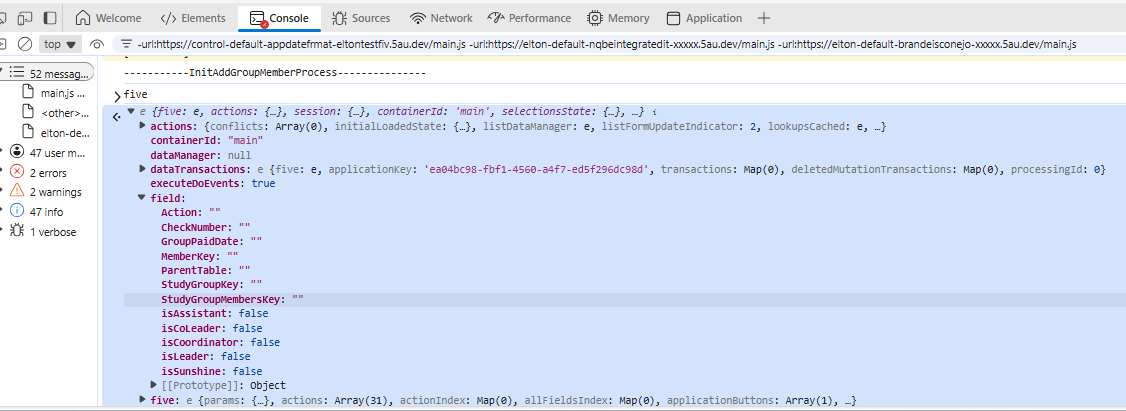
Regarding the values not displayed in the field, after debugging your app, I can see that the names of the properties do not match the process fields.

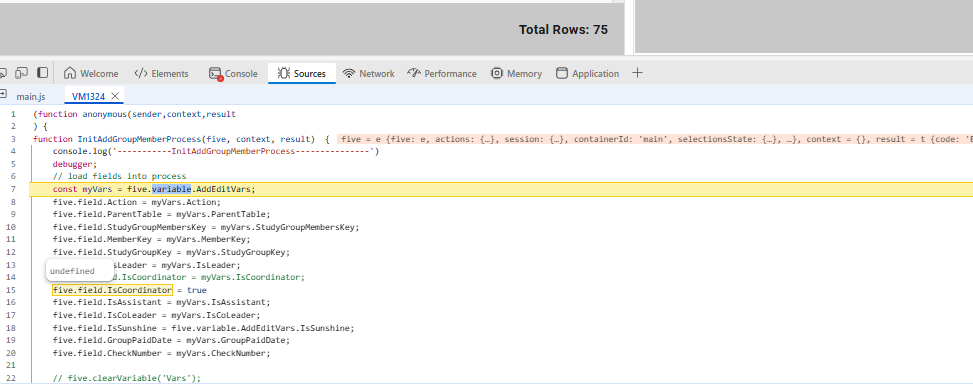
They are starting with a capital ‘I‘, instead of a lowercase ‘i‘. the image below shows this mismatch.

Could you please change in the function ‘InitAddGroupMemberProcess’ the name of the properties to:
five.field.isLeader = myVars.IsLeader;
five.field.isCoordinator = myVars.IsCoordinator;
five.field.isAssistant = myVars.IsAssistant;
five.field.isCoLeader = myVars.IsCoLeader;
five.field.isSunshine = five.variable.AddEditVars.IsSunshine;


Observation: as you can see in my image, you can also debug a client-side code by adding the ‘debugger’ to it and then removing it when the tests finishes.

Thank you. Let me know if you still have any issues.

Regards,
Elton Santos